

Give your next idea a little movement.
Create video from a prompt or use an image as a starting point with supported models. Explore motion for your product, campaign, or creative concept.
Start with a prompt. Bring it to life.
Describe your scene or start with an image. Explore movement, mood, and camera direction for your next video.
 Nano Banana ProNano Banana 2
 Seedream 5
 GPT Image 1.5
 Recraft V4
 Flux 2.0 Max
Text to video
Turn a few words into a video.
Create video content without filming a scene. Describe what you want to see, set the mood and camera movement, and explore ideas for campaigns, social posts, and visual stories.
Cinematic aerial shot gliding slowly forward over a rugged Mediterranean coastline at sunrise. Turquoise waves break gently against cream limestone cliffs, fine sea mist catches warm golden light. Natural film colors, tranquil atmosphere, smooth continuous camera movement, no cuts, no text.
Text to video5 sec
Image to video
Bring your images to life.
Give your existing visuals a new role in your content. Start with a photo or generated image, describe the movement, and create a video for your ads, website, or social channels.
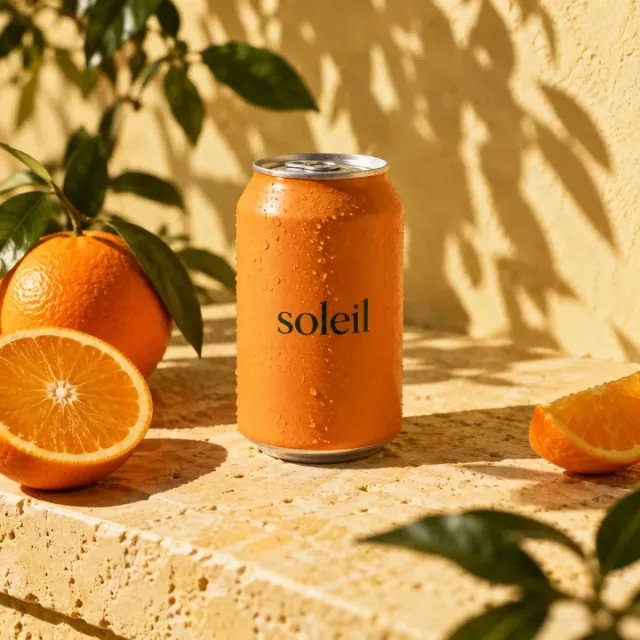 Starting image
 First frame
Slow cinematic camera push toward the orange beverage can. Leaves sway softly in a light summer breeze, casting gently moving shadows across the warm stone and can. Tiny condensation droplets glisten. Preserve the can shape and lettering, keep all objects in place. Subtle realistic motion, one continuous shot.
Image to video5 sec
How to generate videos with AI
- 01
Start with a scene
Describe the subject, atmosphere, and movement you want. Use an image as a starting point when the selected model supports it.
- 02
Choose your settings
Select an available video model and the options it supports. Duration, format, and inputs depend on the model.
- 03
Review the result
Play back your generated video, then develop a new version or keep it with the other assets in your project.
A few things to know.
Make your next idea in Quickmake.
Your references, creative tools, and designs. One place to make.
Explore video creation