


GPT Image 2.5 currently has the stronger overall benchmark results. Nano Banana 2 remains worth evaluating for search grounding, flexible image formats, and generation costs. For creative work, the useful question is which model produces an acceptable asset with the least generation cost, waiting, and manual correction.
The comparison involves three models. OpenAI offers GPT Image 2.5 Flare, optimized for speed, and GPT Image 2.5 Sunburst, optimized for quality. Google's Nano Banana 2 is Gemini 3.1 Flash Image. Nano Banana Pro and Nano Banana 2 Lite are different models. OpenAI model guidance, Google model documentation.
Research checked October 5, 2026. Benchmark snapshot dates are identified below. The generated examples illustrate evaluation tasks; they are not a scored head-to-head comparison.
For supported workflows, release sources, and Quickmake credit estimates, see the Nano Banana 2 guide and GPT Image 2.5 guide. Their family pages compare the broader Nano Banana and GPT Image lineups.
Which model should you try first?
| Priority | Start by evaluating | Why |
|---|---|---|
| Demanding final artwork | GPT Image 2.5 Sunburst | Strongest overall results in the cited benchmarks |
| Quick iteration with strong quality | GPT Image 2.5 Flare | Competitive quality and lower measured latency in ImageBench |
| Reference-based editing | GPT Image 2.5 Sunburst | Leads the cited single-image editing leaderboard |
| Generation informed by web references | Nano Banana 2 | Documented integration of web and image search |
| Very wide or tall compositions | Nano Banana 2 | Supports aspect ratios including 8:1 and 1:8 |
| Lowest cost for your workload | Compare matching settings | Dimensions, quality, input images, and retries affect the result |
These are editorial starting recommendations drawn from the evidence below. An overall leaderboard cannot tell you whether a model will preserve your particular packaging or render every character in your campaign copy correctly.
Independent benchmark results
Artificial Analysis text-to-image preference
Artificial Analysis measures preference through pairwise human votes. Its AA-Image-T2I v2.0 leaderboard, retrieved October 5, 2026, showed:
| Model and configuration | Rank | Elo | Reported 95% interval | Samples |
|---|---|---|---|---|
| GPT Image 2.5 Sunburst — max | 1 | 1,197 | 1,188–1,206 | 14,212 |
| GPT Image 2.5 Flare — max | 2 | 1,191 | 1,182–1,200 | 13,591 |
| Nano Banana 2 | 6 | 1,125 | 1,117–1,133 | 18,759 |
Both OpenAI configurations lead Nano Banana 2 here. Sunburst and Flare are much closer: their reported intervals overlap, so the small difference does not justify declaring Sunburst an unequivocal winner on this benchmark alone. Artificial Analysis text-to-image leaderboard.
Elo describes relative preference within an evaluation. A 72-point difference does not mean an image is 72% better. Scores from separate leaderboards should not be averaged or compared as though they use a common scale.
Arena generation and editing results
Arena's text-to-image board was dated September 24, 2026. Its single-image editing board was dated September 29.
| Model | Text-to-image score | Single-image editing score |
|---|---|---|
| GPT Image 2.5 Sunburst | 1,424 ±8 | 1,522 ±5 |
| GPT Image 2.5 Flare | 1,401 ±8 | 1,478 ±5 |
| Nano Banana 2 — web search | 1,261 ±4 | 1,387 ±3 |
The GPT Image 2.5 entries were marked preliminary. Nano Banana 2's listed configuration included web search. These details matter when comparing the results with another application or API setup. Arena text-to-image results, Arena image-editing results.
The editing result supports evaluating Sunburst first for demanding reference work. It does not establish perfect preservation, and a single-image leaderboard does not prove performance over a long sequence of edits.
ImageBench capability and latency
ImageBench V1.2 evaluates 192 prompts across six categories. Its overall score combines capability grading and estimated aesthetic preference equally; it is not simply a percentage of successful prompts.
| Model | Overall score | Capability pass rate | Reported latency |
|---|---|---|---|
| GPT Image 2.5 Sunburst | 82.1 | 88.0% | 16.9 seconds |
| GPT Image 2.5 Flare | 81.5 | 86.5% | 13.2 seconds |
| Nano Banana 2 | 74.9 | 77.1% | 28.1 seconds |
ImageBench publishes the outputs for inspection. Its automated judges can make mistakes. These timings also describe its particular configurations: the Google entry uses a fal/google/ endpoint, while the OpenAI entries use openai/. They are not guaranteed response times across providers. ImageBench leaderboard and methodology summary.
These measurements challenge the blanket claim that Nano Banana 2 is always faster. For your own workflow, measure the time from submitting a request to receiving a usable image, including any retries.
Image quality and prompt adherence
The overall evaluations favor GPT Image 2.5, making it a sensible starting point for a demanding brief. But an impressive image can still fail the job.
For product photography, inspect the silhouette, reflections, contact shadows, and label. Check the composition at its final delivery size: a detailed bottle is not enough if the layout leaves no room for a headline.
For editorial illustration, judge whether the idea reads quickly and whether the subject remains recognizable in a thumbnail. A heavily textured image may look impressive enlarged while losing its focal point in a social feed.
Start with Sunburst when the brief has demanding visual requirements, then evaluate Flare against the same acceptance criteria. Keep the slower or more costly workflow only when its results justify it.
Image editing and subject preservation
OpenAI documents improvements in precise editing and subject preservation for both 2.5 variants. Google supports conversational image editing. Their reliability still needs checking on your assets. OpenAI image prompting guidance, Nano Banana 2 documentation.
A useful test is deliberately narrow: change the background color while preserving the product, label, camera angle, and foreground. Evaluate the changed region and the supposedly unchanged regions separately. A correct background does not compensate for a misspelled brand name.
For repeated edits, keep the original visible alongside the latest result. After several changes, compare against the original again; comparing only consecutive versions can make gradual drift harder to notice. The product example below demonstrates why this matters.
Text rendering and localization
Google highlights improved text rendering and in-image localization for Nano Banana 2, making multilingual advertising a relevant use case to evaluate. Google's developer announcement.
The overall benchmark scores above do not establish a language-by-language typography winner. Test the language, amount of copy, and dimensions you actually need.
For a poster, judge spelling and layout separately. Correct words can still have poor spacing or an unreadable hierarchy. A polished layout can contain one wrong character. Inspect punctuation, accents, numbers, and non-Latin scripts as carefully as the headline.
For production campaigns, editable text remains useful even when a generator renders lettering well. Prices, dates, and translations are easier to maintain as separate layers in a design editor.
Search grounding and output formats
Nano Banana 2 supports generation informed by web and image search. Its documented resolution options include 0.5K, 1K, 2K, and 4K, with unusually wide and tall aspect ratios including 4:1, 1:4, 8:1, and 1:8. Google model specifications.
That makes it worth evaluating for briefs involving visual references from the web or panoramic banners. Treat search grounding as an input advantage rather than a guarantee of factual accuracy. For an architectural illustration, inspect the building's geometry and distinguishing details before approving it.
Also distinguish provider capabilities from the controls exposed by your application. A model's API feature is only useful to your workflow if the interface you use supports it.
Pricing and cost per accepted asset
Google lists these standard image-output prices for Nano Banana 2:
| Output resolution | Image-output price |
|---|---|
| 0.5K | $0.045 |
| 1K | $0.067 |
| 2K | $0.101 |
| 4K | $0.151 |
Input, text/thinking output, and chargeable search queries can add costs. Batch pricing is lower. Google API pricing.
For both GPT Image 2.5 variants, OpenAI lists standard rates of $5 per million text-input tokens, $8 per million image-input tokens, and $30 per million image-output tokens. A per-image estimate depends on the generation settings and resulting usage. OpenAI API pricing.
Artificial Analysis lists approximately $210.70 per 1,000 images for each tested GPT Image 2.5 “max” configuration and $67 per 1,000 images for Nano Banana 2. That is roughly a 3.1× difference for those configurations, not a universal price ratio. Artificial Analysis pricing comparison.
A more useful business measure is cost per accepted asset: total generation spend divided by the number of accepted assets.
For example, a hypothetical $0.07 generation that needs five attempts costs $0.35 per accepted asset. A $0.20 generation accepted immediately costs less overall. Neither example predicts these models' real acceptance rates; it illustrates why retries belong in the calculation. Track manual correction time separately.
Quickmake quotes generation in AI credits. Direct API prices are not Quickmake credit prices. Open the AI image generator and check the generator's quote for your chosen model and settings.
Generated examples and reusable prompts
Product photography with exact lettering
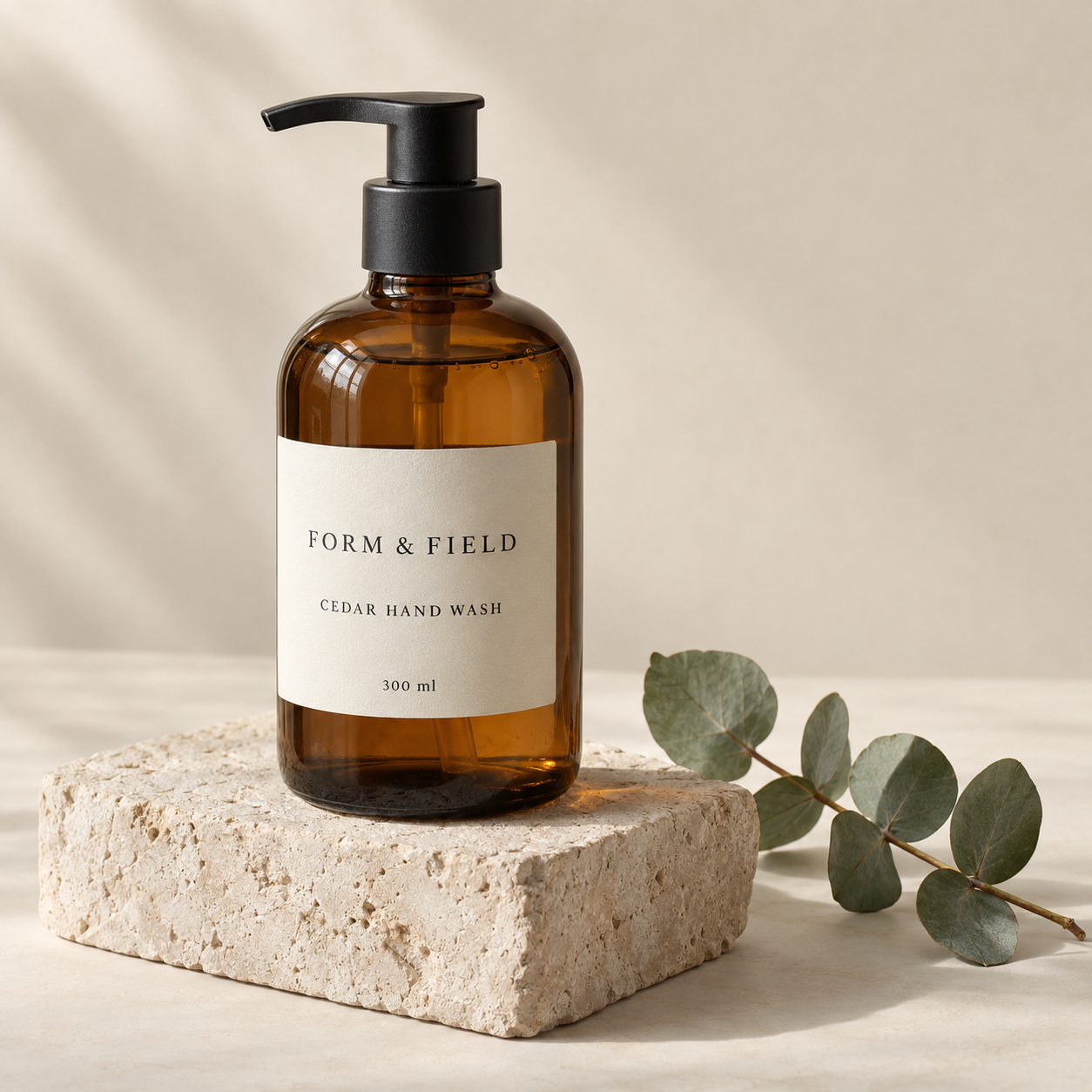
Illustrative product brief testing exact lettering, material rendering, and object placement. Model identity is unverified.
Create a square studio photograph of one amber glass hand-soap bottle with a matte black pump, sitting on a pale limestone block against a warm cream backdrop. Three-quarter front view, soft daylight from the upper left, believable glass refraction and a soft contact shadow. The ivory paper label must display exactly three lines: “FORM & FIELD”, “CEDAR HAND WASH”, “300 ml”. The pump points to the left. One eucalyptus sprig lies on the surface to the right of the block. Restrained editorial product photography with realistic fine textures. No other objects, no other lettering, no watermark.
All three requested label lines are readable, and the pump points left. The bottle and stone provide useful surfaces for inspecting reflections and texture. Since this is a fictional product generated from text, it does not test fidelity to an existing product photograph.
A controlled background edit
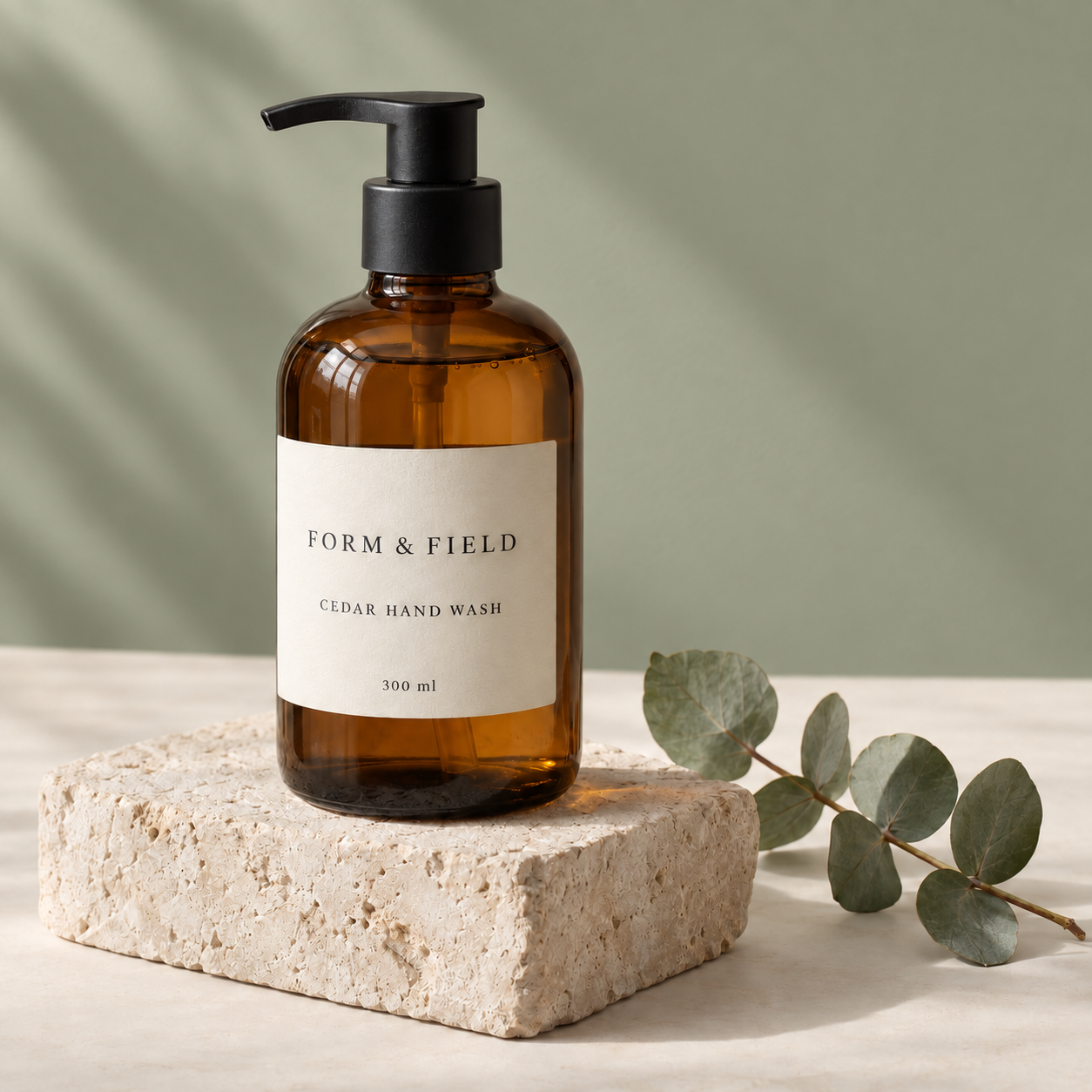
Background-only editing brief using the preceding image as its reference. Compare the product and foreground as carefully as the changed wall.
Change only the cream background wall to a muted sage-green wall. Keep the amber bottle, its exact silhouette and size, black pump pointing left, all three label lines (“FORM & FIELD”, “CEDAR HAND WASH”, “300 ml”), typography, label texture, limestone block, eucalyptus sprig, foreground surface, framing and camera angle unchanged. Preserve the direction and softness of the light. Do not add or remove any objects. Produce one square photograph.
The background changes and the label remains readable. The overall composition is retained, but some limestone texture changes too. This is why “looks similar” and “preserved everything requested” should receive different judgments. Reuse the same source image when comparing the three named models through their actual endpoints.
Bilingual poster typography
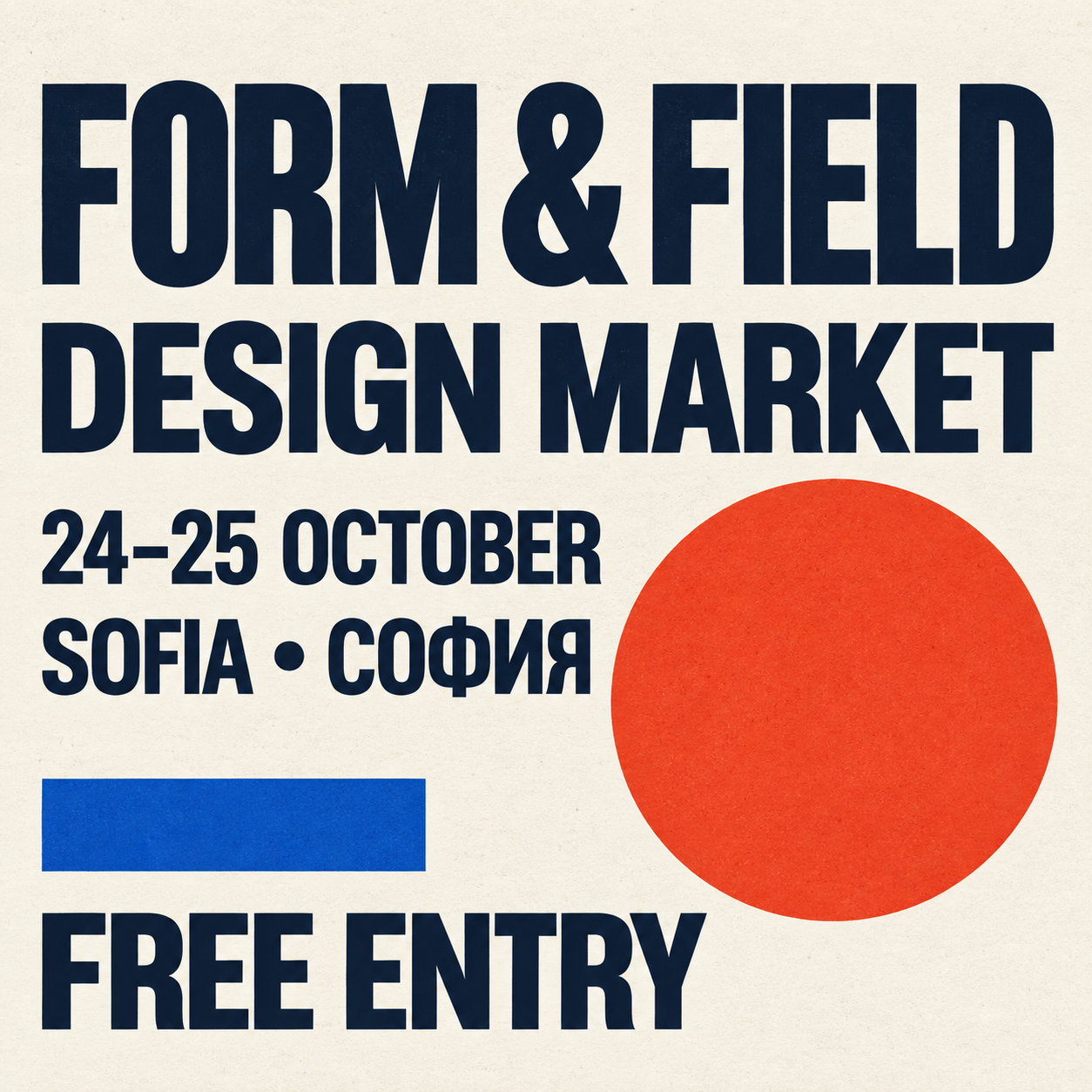
Illustrative bilingual poster testing exact copy and typographic hierarchy. The event is fictional.
The following reusable prompt normalizes the submitted brief; the generation record preserves the original wording.
Create a square contemporary design-market poster. Warm ivory paper with a subtle printed texture, oversized dark navy modern sans-serif type with clear hierarchy, a bold vermilion circle and a small cobalt rectangular accent. Render exactly these five lines: “FORM & FIELD”, “DESIGN MARKET”, “24–25 OCTOBER”, “SOFIA • СОФИЯ”, “FREE ENTRY”. Use Cyrillic for “СОФИЯ”. Balanced margins and generous spacing. Flat front-facing graphic design, no perspective mockup, no photographed frame, no watermark. The typography is the focal point.
The requested wording appears legible, including the Cyrillic city name. A complete review should also inspect character shapes, punctuation, spacing, and readability at the intended display size. A single successful example does not establish multilingual reliability.
How to compare the models on your own work
Use the same briefs and source images for Nano Banana 2, Flare, and Sunburst. Record the exact model, provider, dimensions, quality setting, and whether search is enabled. If settings cannot be matched, state the difference.
Generate several independent results per brief and retain failures as well as successes. Review outputs without model labels where practical. Score four things separately:
- Instruction compliance: Did it include the requested elements and exact text?
- Visual quality: Does it work at the intended delivery size?
- Preservation: For edits, what changed outside the requested area?
- Production effort: How much time and money did an accepted asset require?
For editing, give every model the same original source. Starting each model from a different generated image introduces another variable. Decide what counts as acceptable before reviewing results, and avoid selecting one attractive output while hiding repeated failures.
Our recommendation
Start with GPT Image 2.5 Sunburst when final quality and editing precision dominate the brief. The cited independent results support that choice. Evaluate Flare when turnaround matters; it scores close to Sunburst in some evaluations and records lower latency in ImageBench.
Evaluate Nano Banana 2 when search grounding, unusual aspect ratios, or its generation economics matter to the workflow. Choose based on repeated success on your own briefs, including acceptable lettering, preserved details, and manageable revision effort.
Explore the AI image generator and AI image editing workflow. Bring the selected output into the design editor to finish the layout and keep campaign copy editable.